International
 Malaysia
 Indonesia
 Thailand
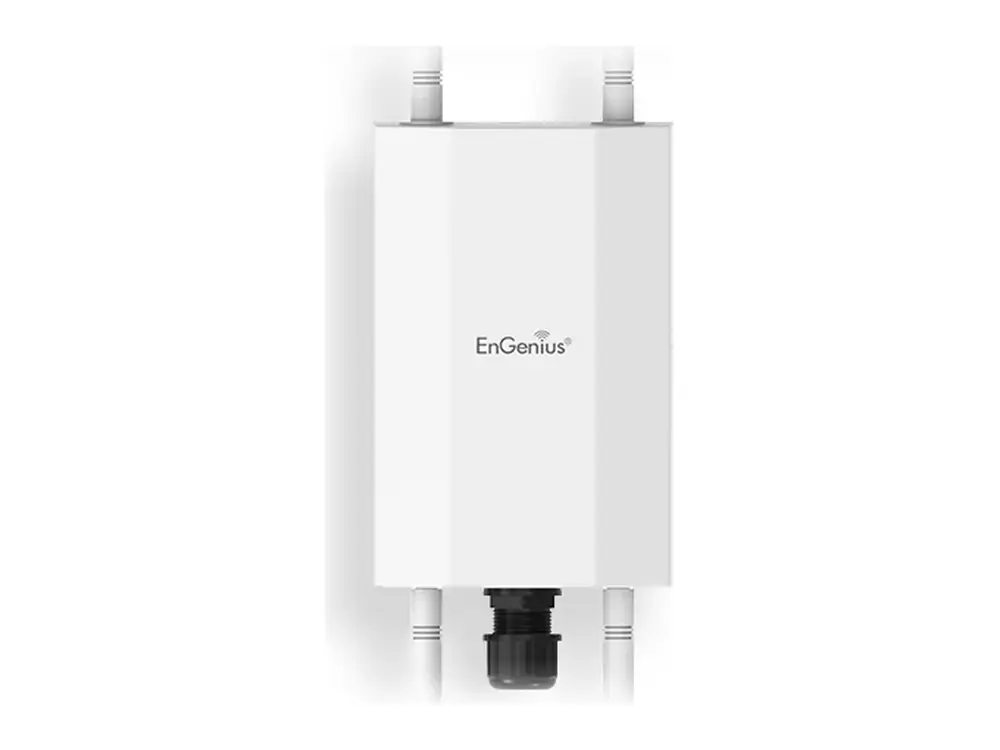
 EWS850AP
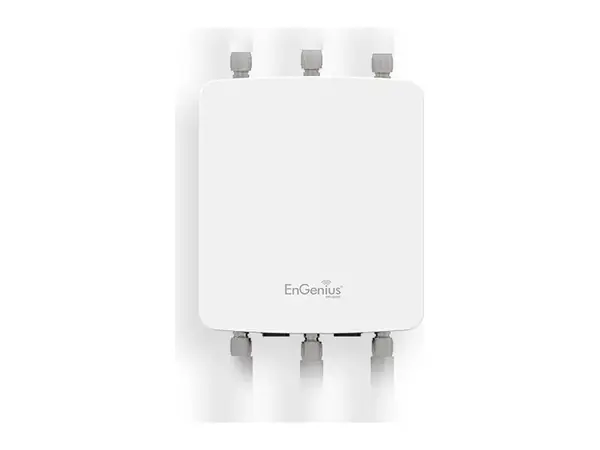
EnGenius EWS850AP Managed Wi-Fi 6 outdoor access point
EWS 11ax Managed Outdoor Access Point (2×2 Dual-Band)
The EnGenius EWS850AP is a managed Wi-Fi 6 outdoor access point: EWS 11ax Managed Outdoor Access Point (2×2 Dual-Band). It suits resorts, hotel pools and outdoor dining and campuses, parks and stadiums. Vemax Distribution Sdn Bhd supplies the EWS850AP in Malaysia through resellers and system integrators, with local warranty and pre-sales support from offices in Kuala Lumpur, Kuching, Penang and Kota Kinabalu.
- Outdoor Wi-Fi access point
- Wi-Fi 6
Supplied by Vemax Distribution Sdn Bhd, EnGenius distributor in Malaysia, with local stock, warranty and RMA support.
Key features of the EWS850AP
- EWS 11ax Managed Outdoor Access Point (2×2 Dual-Band)
Best for
- Resorts, hotel pools and outdoor dining
- Campuses, parks and stadiums
- Factories, warehouses and yards
- Car parks and petrol stations
EWS850AP overview
EWS850AP is the first Wi-Fi 6 outdoor solution of EnGenius. The edge 802.11ax built-in ultra speed access point with OFDMA and MU-MIMO technology for high-density use on multiple applications. Dual concurrent 802.11ax architecture and backward compatible with ac wave2/ac/a/b/g/n client devices. 360° omni-directional antennas to achieve comprehensive coverage for networking cli-ent devices under a pervasive environment. Compliance with Proprietary 48V PoE Input for flexible installation and implementing remotely reset/reboot Access Point over 100 meters (328 feet). Robust housing with IP67 enclosure rated to deploy at extremely weather . Systemic and distributed management over EnGenius ezMaster, Skykey controller, and EWS Management switch without licensing or subscription fee.
Product description from EnGenius.
EWS850AP key specifications
| Wi-Fi standard | 802.11a/b/g/n/ac/ax |
|---|---|
| Radio | 2.4 GHz & 5 GHz |
| Radio chains (MIMO) | 2 x 2:2 |
| Max rate 5 GHz | 1,200 Mbps |
| Max rate 2.4 GHz | 574 Mbps |
| Ethernet ports | 1 x 10/100/1000/2500 Ethernet Port |
| Power / PoE | 802.3af/at |
| Transmit power 5 GHz | Up to 25 dBm |
| Transmit power 2.4 GHz | Up to 23 dBm |
| Mesh | Yes |
| Mounting | Wall/Pole |
| IP rating | IP67 |
| Dimensions | 190 x 124 x 47 mm |
Full technical specifications
Technical Specifications Ap
| Standard | 802.11ax and ac/a/b/g/n compliance |
|---|---|
| Antenna | SMA Type interfaces 2.4GHz: Two(2) detachable 5.0dBi SMA antennas 5GHz: Two(2) detachable 5.0dBi SMA antennas |
| Antenna | Optional Solutions Alternative solution to compatible with SA2216 and SA5219 sector Antennas |
| Physical Interface | One (1) 10/100/1000/2.5G BASE-T RJ-45 Ethernet Ports 4 x SMA Connector Interfaces |
| LED Indicators | Display system and wireless transmission status |
| Power | Maximum Power Consumption |
| Maximum 15.9W | Power Source 802.3af/at Compliance Source Proprietary 48V-54V Active Ethernet (Power Over Ethernet, PoE) |
| Surge Protection | 1KV |
| ESD Protection | Contact: 4KV Air: 8KV |
| Mounting | Pole Mount Wall Mount |
Wireless Radio Specifications Ap
| Access Point Type | Outdoor, IP67, dual radios concurrent, 5GHz 802.11ax 2×2 MU-MIMO is backwards compatible with 802.11 ac/a/n mode, 2.4GHz 802.11 ax 2×2 MU-MIMO is backwards compatible with 802.11 b/g/n. |
|---|---|
| SU-MIMO | Two(2) spatial streams SU-MIMO for 2.4GHz and two(2) spatial streams SU-MIMO for 5GHz up to totally 1,774Mbps wireless data rate to a single 11ax wireless client device under the both 2.4GHz and 5GHz radio. |
| MU-MIMO | Two(2) spatial streams multi-user (MU)-MIMO for up to 1201 Mbps wire-less data rate to transmit to one(1) two streams MU-MIMO 11ax capable wireless client devices under 5GHz simultaneously. Two(2) spatial streams multi-user (MU)-MIMO for up to 574 Mbps wireless data rate to transmit to one(1) two streams MU-MIMO 11ax capable wireless client devices under 2.4GHz simultaneously. |
| Frequency Radio | 2.4GHz: 2400MHz ~ 2482MHz 5GHz: 5150MHz~5250MHz, 5250MHz~5350MHz, 5470~5725MHz, 5725MHz~5850MHz Support radios and channels will be varied on the configured regulatory domain. |
| Supported Radio Technology | 802.11ax: Orthogonal Frequency Division Multiple Access (OFDMA) 802.11b: Direct-sequence spread-spectrum (DSSS) 802.11ac/a/g/n: Orthogonal Frequency Division Multiple (OFDM) 802.11ax supports very high throughput (VHT) — HE 20/40/80 MHz 802.11ac supports very high throughput (VHT) — VHT 20/40/80 MHz 802.11n supports high throughput (HT) — HT 20/40 MHz 802.11n supports very high throughput under the 2.4GHz radio –VHT40 MHz (256-QAM) 802.11n/ac/ax packet aggregation: A-MPDU, A-SPDU |
| Supported Modulation Type | 802.11b: BPSK, QPSK, CCK 802.11a/g/n: BPSK, QPSK, 16-QAM, 64-QAM 802.11ac: BPSK, QPSK, 16-QAM, 64-QAM, 256-QAM 802.11ax: BPSK, QPSK, 16-QAM, 64-QAM, 256-QAM, 1024-QAM |
| Transmit Power (Maximum Value) | 2.4GHz: 23dBm 5GHz: 25dBm Maximum power is limited by regulatory domain |
| MU-MIMO | allows multiple spatial streams to be allocated to different clients simultaneously on both download and upload sides. |
| OFDMA | Orthogonal frequency-division multiple access (OFDMA) allows a single transmission to be split by frequency within a channel. |
| Tx Beamforming (TxBF) | Increasing signal reliability and transmitting distance. |
| BSS Coloring | BSS coloring marks different colors on each data which will allows client devices to stop receiving a frame and return to sleep mode as soon as they recognize these frames are not of interest to them. |
| Target Wake time (TWT) | The target wake time feature lets your devices to keep a radio receiver sleeping and wake it up as needed to receive periodic transmissions from an access point. The result is significant power-saving for battery-powered devices. |
| Supported data rates (Mbps) | 802.11b: 1, 2, 5.5, 11 802.11a/g: 6, 9, 12, 18, 36, 48, 54 802.11n: 6.5 to 300 (MCS0 to MCS15) 802.11ac: 6.5 to 867 (MCS0 to MCS9, NSS=1 to 2) 802.11ax: 2.4GHz: 9 to 574 (MCS0 to MCS11, NSS=1 to 2) 5GHz: 18 to 1201 (MCS0 to MCS11, NSS=1 to 2) |
Management Features Ap
| ACK timeout (Distance Control) | Set the ACK timeout to assure the proper distance to deliver wireless signal properly |
|---|---|
| Site Survey | Scan signal level of an environment to provide parameters for performing Auto Transmit power and auto channel. |
| Auto Transmit Power | Automatically adjust power level |
| Auto Channel | Automatically assign a clearly channel to perform RF transmission under a pervasive environment. |
| Fast Roaming (802.11k) | Collect the parameters of neighborhood Access Points to find the optimal AP. Fast Roaming (802.11v) Cognize the signal strength of client devices under each to steer these client devices to one of Access Points if signal level is less than the default value of AP systems. |
| Band Steering | Steer client devices to a proper frequency band for getting more band-width and speed under an Access Point. |
| RSSI Threshold | Kick client devices that the signal (RSSI) is above the set value from the AP for reducing the interference and optimize the connecting quality. |
| Multiple SSIDs | BSSID support Support 8 SSIDs on both 2.4GHz and 5GHz bands. |
| Guest Network | Isolate each client for avoiding an unnecessary touch, leaking sensitive data, and enhancing Internet security and reliability. The function will only available on stand-alone mode. |
| VLAN Tag | Independent VLAN setting can be enable or disable. Any packet that enters the Device without a VLAN tag will have a VLAN tag inserted with a PVID (Ethernet Port VID). |
| VLAN Pass-through | Broadcast VLAN-tag packets to find the destination and deliver packets over the defined path. The functions allows network topology scalable and flexible. |
| VLAN Per SSID | Integrate VLAN ID with a SSID interface to forward packets over the de-fined path. The functions isolate client devices to get more security. |
| Management VLAN | Feature is enabled with specified VLAN ID, the device will only allow management access with the same specified VLAN ID from remotely location by using protocols such as telnet, SSH, snmp, syslog etc. |
| Traffic Shaping | Controls the bottle of bandwidth to offer the limited bandwidth for an individual SSID or each client per Access Point. |
| MAC Address Filtering | Filter up to 32 sets MAC addresses per SSID |
| E-Mail Alert | Provides a network monitoring tool for administrators to stay informed the configuration change. |
| Save Configuration as Users Default | Save the customized configuration as default value for different customer demands. |
| Wi-Fi Scheduler | Perform a regular reboot on access point at assigned schedule Perform it to enable or disable 2.4GHz or 5GHz interface from a period time. |
| SNMP &MIB&CLI | v1/v2c/v3 support MIB I/II, Private MIB CLI Supported |
| RADIUS Accounting | Help operators to offload 3G to Wi-Fi seamlessly |
| Wireless Clients list | Provide the list to display real status of wireless client devices on this Access Point. |
| Hotspot 2.0 | This function will allow client devices to discover wireless Access Point under an environment and to automatically exchange data for getting authorization on accessing Internet when roaming between Access Points. |
Specifications from EnGenius. Subject to change by the manufacturer; check the official datasheet for the latest details.
EWS850AP questions
Where can I buy the EnGenius EWS850AP in Malaysia?
Vemax Distribution Sdn Bhd is the EnGenius distributor in Malaysia. You can buy the EWS850AP through our reseller and system integrator network in Kuala Lumpur, Selangor, Penang, Johor, Sabah and Sarawak. Contact Vemax at +60 16-874 7515 or sales@vemax.com.my and we will connect you with a reseller or quote you directly for projects.
What is the price of the EnGenius EWS850AP in Malaysia?
Pricing depends on quantity and project size. Request a quote from Vemax for the latest EWS850AP price in Malaysia. Registered resellers receive dealer pricing.
Does the EWS850AP come with a Malaysian warranty?
Yes. Units supplied by Vemax carry the official EnGenius warranty with local RMA handled in Malaysia, so there is no need to send products overseas.
Where can I download the EWS850AP datasheet?
Use the "Download datasheet" button on this page. It downloads the official PDF directly from EnGenius.
Can I become a EnGenius reseller in Malaysia?
Yes. Vemax works with IT resellers, ELV contractors and system integrators across Malaysia. Register through the contact form to get dealer pricing, demo units and technical training.